
Activity Summary

Screen Time

Mature Content Blocker

Social Media Monitor

App Blocker
Activity Summary

Website Blocker

Family Locator

Collaboration
ONLINE ACTIVITY SUMMARY
Track Your Child’s Screen Time, Apps & Websites
Mobicip’s Activity Summary helps you track screen time, apps, and browsing habits across
all your child’s devices.


Ensure Online Safety & Well
Being
Concerned about your child’s digital habits?
Mobicip’s Activity Summary lets you easily track
screen time, app usage, and browsing history helping
you build healthier online habits. Mobicip ideal for
parents seeking a comprehensive Parental Control
Dashboard or a smart Online Monitoring App.
Key Features & Benefits
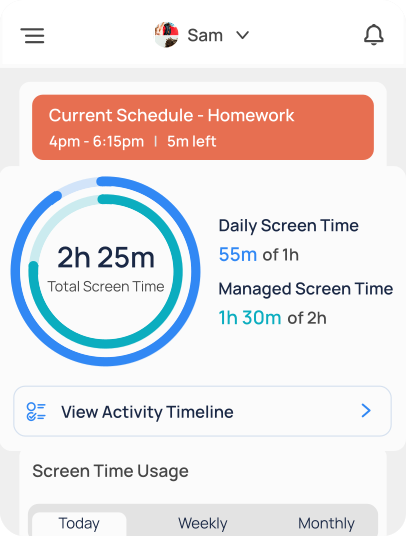
Screen Time Management
Monitor daily screen time and set healthy limits tailored to your child’s needs.
App & Social Media Usage
Track time spent on social media, video, chat, and gaming apps.
Detailed Browsing History
Review websites and videos accessed, and block inappropriate content instantly.
URL and App Access Requests
Easily manage requests for more screen time or app access directly from your dashboard
Location History
View the places your child visits to ensure they stay safe.
Why Parents Love Mobicip?
Jenna R, Glasgow, UK

Mobicip gives me peace of mind knowing what my kids are doing online.
Marcus T, Mississipi, US
I love how I can manage all devices from one place.
Awards & Recognitions

Honoring Excellence

Gold Recipient

Trusted Provider

Satisfaction Guaranteed
Frequently Asked Questions
What is Mobicip’s Activity Summary?

Mobicip’s Activity Summary provides insights into your child’s screen time, app usage, location and
browsing habits through an intuitive dashboard.
Can I monitor multiple devices with one account?
Yes, Mobicip supports multiple devices across iOS, Android, Windows, Chromebook, Kindle fire and MacOS
platforms.
Does Mobicip send activity reports automatically?
Yes, you’ll receive daily/weekly summaries via email, so you’re always informed.


Works with iOS, Android, Windows, Chromebook, MacOS and Kindle fire.
Download
Mobicip Parental Control
Works with iOS, Android, Windows,
Chromebook, MacOS and Kindle fire.
Related Articles & Resources

Find your child’s online activity insights with Mobicip
Mobicip activity summary insights provide parents with a comprehensive view of their child’s online
behavior and screen time habits.Did you know 70%…
Last updated: February 27, 2026

How Mobicip Makes Managing Your
Child’s Devices Easy
The Importance of Digital SafetyRemember when
the most prominent danger kids faced was
getting
scraped knees from playing outside? Ah, those wer…
Last updated: September 04, 2024

How to Discuss Online Privacy with
Your Teen: Tips for Parents
Understanding Online PrivacyOnline privacy is not
just a matter of controlling personal
information
shared online. It’s a crucial aspect for teens, as thei…
Last updated: September 01, 2024