SCREEN TIME
Schedule Screen Time & App Usage
Set daily screen time schedules for apps and websites to help create a
healthier
balance. Limit usage by app or category, remotely lock devices when needed, and view simple
reports to
stay informed and take action when necessary.


Features of Mobicip Screen Time Scheduler
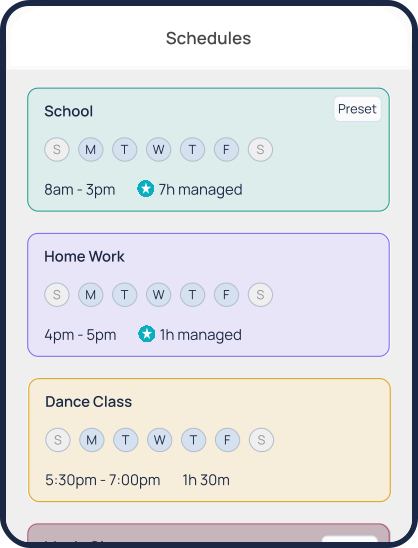
Schedules
Set schedules for schoolwork, homework, sleep, and daily activities
for screen
time balance. Block specific apps and websites during scheduled periods to keep
distractions away.
Daily Free Time Limit
Set a daily allowance for entertainment apps like games, social
media, and
streaming platforms—helping kids enjoy screen time within set boundaries.
Family Time
Need full attention from the family? The “Pause All Devices” feature
instantly locks all connected devices, creating calm, distraction-free moments for real
connection.
How to Manage Screen Time with Mobicip
Setup schedules and screen limits to improve focus and productivity.

Davis

It’s a great app for kids. It keeps track of everything the
child does
including
the amount of time spent in different apps and when settings are changed. It’s safe when
I can mess
around
in the kitchen and still keep my kids safe from toxic things.

Susan
Mobicip works great for my family. It’s easy to use and
navigate, and also is
very comprehensive.
Why Limiting Screen Time is Important?
Kids are spending more time on screens than ever before. Studies show that children
spend ~ 8
hrs on screens every day. Even though some of it might be educational, spending too much time on
screens has
been linked to not getting enough sleep, bad grades and a greater risk of obesity. Check out the screen time recommendations from American Academy of Child & Adolescent
Psychiatry.
How Much Time Kids and Teens Are Spending on Their Screens?

Kids between
8 and 12 in the U.S. typically spend
about 4 to 6 hours a day
glued to their screens,
while
teens spend close to 9 hours.
What’s the Recommended Screen Time for a Healthy Balance?

Age –
2 – 12
Time –
1 h/day

Age –
Teens
Time –
2 h/day
How do kids bypass Apple Screen
Time?
Negative Effects of
Technology & How To Overcome Them
Effects of Screen Time on Sleep & Sight
Small screens (smartphones, iPads, iPods, tablets etc.) can affect sleep by:

Throwing off the natural sleep cycle and circadian rhythm
Stimulating mental activity when it’s time to shut down and relax
Interrupting sleep with notifications and pings
Emitting blue light
Studies conducted by the American Academy of Pediatrics have shown that children who sleep with a
device
nearby don’t get a restful sleep and feel less energetic in the morning. The National Sleep
Foundation
recommends that you should stop using tablets & smartphones at least 30 minutes before
bedtime. While it
would be ideal to clear all electronic devices from the bedroom, it might not be practical in
most cases.
Parents could establish a common nighttime charging station or use screen time monitoring
software like
Mobicip to limit screen time more effectively.
A good restful sleep is crucial for overall wellbeing and development. And for children in the
formative
years of cognitive & physical growth spurts, it is extremely important to ensure a good
sleep routine.
Inadequate sleep has been linked with obesity, poor academic performance, crankiness among other
behavioral
issues, and other serious health issues.
Parents are increasingly monitoring their family’s screen time consumption. We recommend you
refer to the
American Academy of Pediatrics for guidelines.
How to Reduce Screen Time for Kids: Tips, Strategies, and Benefits
Why Choose Mobicip’s Screen Time?
Mobicip’s screen time feature(s) go well beyond what Apple’s Screen
Time
and Google’s Family Link currently offer.
An average digital family has 5 devices – 2 smartphones, 2 computers, and 1 tablet. The screen
time tools
from Apple and Google are limited to their respective
platforms alone!
Mobicip works across iPhones, iPads, Android devices, Chromebooks, Windows PCs, Macs and Kindle
Fire making
it a truly cross-platform solution.
Apple’s Screen Time is primarily a digital wellness & reporting tool meant
to show
users how they use their screen time on iOS devices. It is not a parental control tool. Parents
can’t set up
content filtering or block apps with this feature, nor can they track location. Screen time has
also been
notoriously easy to bypass much to the delight of many tech-savvy children.
Google’s Family Link can only be used for kids up to the age of 13 on Android
devices.
Internet filtering and blocking inappropriate content is limited to Safe Search on the Chrome
browser; which
is a rather limited option that doesn’t offer customized website/keyword blocking.
Mobicip is not only a great tool to customize your child’s screen time. Mobicip
is the
most comprehensive parental control app for your family. Check out Mobicip’s other cool features
by clicking
on the side panel.
Mobicip Pricing
Choose the plan that’s right for your family
Enjoy Premium features FREE for 7 days
-

Premium
$7.99
/month
Billed Annually
Start
Free Trial
Manage up to 20 Devices
App Blocker
Uninstall Protection
Website Blocker
Screen Time Limits
Managed Schedules
Family Locator
Remotely Lock Devices
Activity Reports
Social Media Monitor
App Timers
Parenting Expert Tips -
Standard
$4.99
/month
Billed Annually
Start
Free Trial
Manage up to 10 Devices
App Blocker
Uninstall Protection
Website Blocker
Screen Time Limits
Managed Schedules
Family Locator
Remotely Lock Devices
Activity Reports
Social Media Monitor
App Timers
Parenting Expert Tips -
Lite
$2.99
/month
Billed Annually
Start
Free Trial
Manage up to 5 Devices
App Blocker
Uninstall Protection
Website Blocker
Screen Time Limits
Managed Schedules
Family Locator
Remotely Lock Devices
Activity Reports
Social Media Monitor
App Timers
Parenting Expert Tips

Have more than 20 devices ?
Get a Quote
-

Mom’s Choice Awards Gold Recipient -

Certified Secure -

Trusted Provider -

Satisfaction Guaranteed